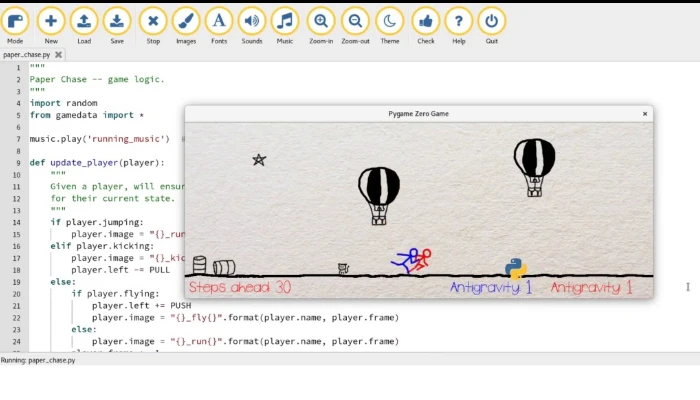





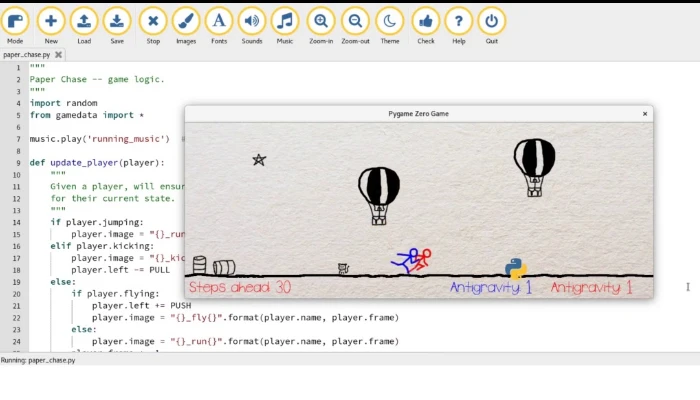
Python Pygame Zero
What you'll learn
• Understand the basics of game development using Pygame Zero
• Work with the game loop: draw() and update()
• Create and control game objects on screen
• Implement keyboard input for player movement
• Apply collision detection and scoring systems
• Build complete game logic with lives and game over states
• Add sound effects and multiple game screens
• Design and develop a fully playable 2D game
This course includes:
• 2 Game Development Challenges
• 6 Hours Live Classes (4 Sessions)
• Online / Onsite (Physical)
• Practice Code Files & Game Assets
• Final Game Project (“Catch the Star”)
• Certificate of Completion
Course Content
Session 1 — Introduction to Pygame Zero & Game Setup
Duration: 90 Minutes
Topics Covered:
• Installing Pygame Zero (pgzrun)
• Understanding the Game Loop (draw() & update())
• Drawing Shapes (Rectangles, Circles, Text)
• Screen Coordinates System (0,0 at top-left)
• Creating Game Window & Title
Key Learning Objectives:
• Understand how games run frame-by-frame
• Create visual elements on screen
• Learn coordinate-based positioning
• Build basic game structure
Activities:
• Install and run pgzrun
• Create a game window
• Draw sky background and ground
• Create player as rectangle
• Display game title text
Session 2 — Movement & Keyboard Controls
Duration: 90 Minutes
Topics Covered:
• Keyboard Input Handling
• Moving Objects using update()
• Player Position Control
• Boundary Conditions
• Speed Control
Key Learning Objectives:
• Control player movement using keyboard
• Apply real-time updates
• Prevent objects from leaving screen
• Improve gameplay responsiveness
Activities:
• Move player in 4 directions
• Add boundary limits
• Adjust movement speed
• Challenge: Enable diagonal movement
Session 3 — Collision Detection & Game Logic
Duration: 90 Minutes
Topics Covered:
• Detecting Object Collisions
• Creating Falling Objects
• Score Tracking System
• Lives System
• Game Over Logic
Key Learning Objectives:
• Implement interaction between objects
• Build scoring mechanisms
• Manage player lives
• Create game-ending conditions
Activities:
• Build “Catch the Star” game
• Create falling object at random position
• Increase score on catch
• Decrease life on miss
• End game after 3 misses
Session 4 — Sound, Screens & Final Game Polish
Duration: 90 Minutes
Topics Covered:
• Adding Sound Effects
• Creating Title Screen
• Game Over Screen
• Difficulty Scaling
• Final Game Optimization
Key Learning Objectives:
• Enhance user experience with sound
• Design multi-screen games
• Increase game difficulty dynamically
• Polish and finalize game
Activities:
• Add catch, miss, and game over sounds
• Create title screen (“Press SPACE to Start”)
• Add game over screen with score
• Increase speed every 5 points
• Final demo and peer review
Practice Projects for Real-World Skills
• Player Movement System
• Collision Detection Game Logic
• Score & Lives System
• Complete 2D Game Development
• Final Project: “Catch the Star” Game
Requirements
• Completion of Python Intermediate Module 1 (Tkinter)
• Understanding of loops, functions, and conditions
• Basic Python programming knowledge
• Laptop/PC with Python installed
Description
This module introduces students to the exciting world of game development using Pygame Zero. Students will learn how to build interactive 2D games by combining programming logic with visual design and user interaction.
From controlling player movement to implementing scoring systems and sound effects, learners will gain hands-on experience in building a complete game from scratch.
Why Choose This Course?
• Learn Game Development Fundamentals
• Build Real Playable Games
• Hands-On Project-Based Learning
• Combines Logic, Creativity & Design
• Engaging and Fun Learning Experience
Activities During Class
• Creating game environments
• Programming player controls
• Implementing collision detection
• Adding sound and effects
• Testing and improving gameplay
Who Is This Course For?
• Students who completed Python Basic Level
• Intermediate learners in Python
• Students interested in game development
• Anyone who enjoys creative coding
Course Highlights
• Game-Based Learning Approach
• Real Game Development Experience
• Interactive and Fun Sessions
• Final Playable Game Project
• Certificate of Completion
Enroll Today!
Start your journey into game development by building your own 2D games. Learn how to design, code, and create interactive experiences using Python and Pygame Zero.
📸 Course Gallery